[//]: # (Thank you for reporting an issue to HTTPS Everywhere.) [//]: # (We welcome input from users on improving this project.) [//]: # [//]: # (Please help us by following this issue template.) [//]: # (You can delete all blank lines and all lines starting) [//]: # (with the comment marker, such as this one.) **Type**: Bug ### Description HTTPSEverywhere preference page isn't compatible with FF's `Dark` theme. ### Steps to reproduce - Set FF theme to Dark (Burger icon -> Customize -> Theme -> Dark) - Open Add-ons Manager (`ctrl+shift+A`) - Click on `HTTPSEverywhere` addon - Click on `Preferences` section ### Actual output Preferences page background is white. 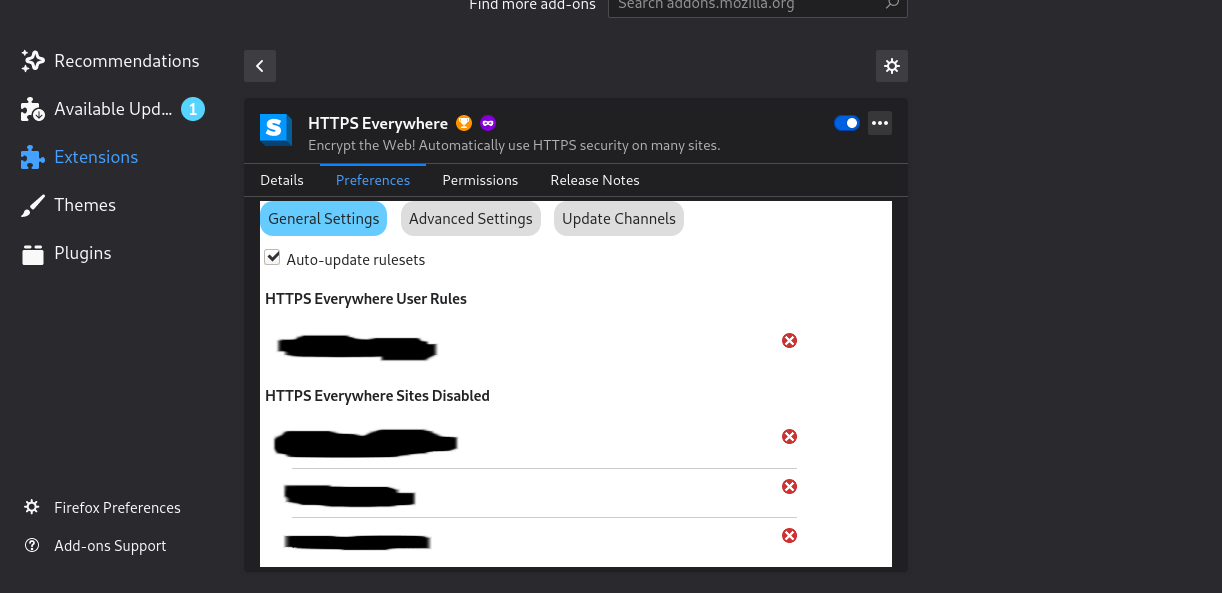 ### Expected output Preferences page background should be same as background of FF.
Type: Bug
Description
HTTPSEverywhere preference page isn't compatible with FF's
Darktheme.Steps to reproduce
ctrl+shift+A)HTTPSEverywhereaddonPreferencessectionActual output
Preferences page background is white.
Expected output
Preferences page background should be same as background of FF.