Description
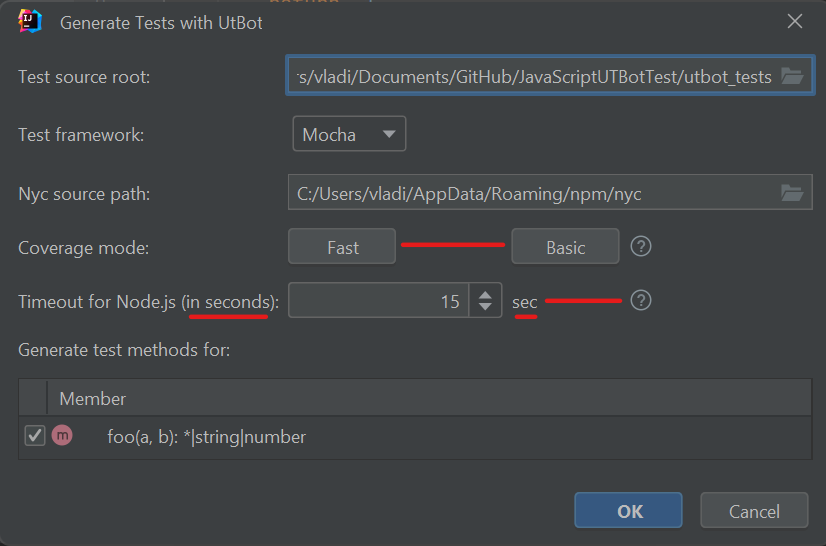
The buttons for selecting Fast and Basic coverage mode are located at an inappropriate distance from each other. Moreover, when opening the plugin window, it is not clear which mode is selected by default.
In the timeout selection field for Node.js, the text “seconds” is repeated twice. Additionally, the tooltip is located at an inappropriate distance from the input field.
To Reproduce
Steps to reproduce the behavior:
- Run UTBot in JavaScript file via IntelliJ IDEA
- Open plugin window
Expected behavior
The buttons for selecting coverage mode should make it clear which mode is selected, the distance between the buttons should be correct.
The text denoting “seconds” must be specified once, the distance from the input field to the tooltip must be correct.
Actual behavior

Description
The buttons for selecting Fast and Basic coverage mode are located at an inappropriate distance from each other. Moreover, when opening the plugin window, it is not clear which mode is selected by default.
In the timeout selection field for Node.js, the text “seconds” is repeated twice. Additionally, the tooltip is located at an inappropriate distance from the input field.
To Reproduce
Steps to reproduce the behavior:
Expected behavior
The buttons for selecting coverage mode should make it clear which mode is selected, the distance between the buttons should be correct.
The text denoting “seconds” must be specified once, the distance from the input field to the tooltip must be correct.
Actual behavior